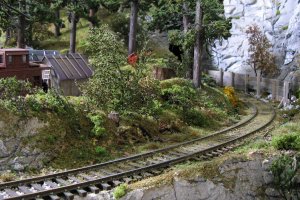
Building the Pinnacle Creek Mining & Timber Co. RR

ModelRailroadForums.com is a free Model Railroad Discussion Forum and photo gallery. We cover all scales and sizes of model railroads. Online since 2002, it's one of the oldest and largest model railroad forums on the web. Whether you're a master model railroader or just getting started, you'll find something of interest here.


Reid, No worries. Everything here is fair game anytime. As I've stated before, it is all about the details. Not only does a loading dock with a few cartons on it help a scene, but I never seem to think my scenery is done.

For example: Instead of vacuuming up all the little bushes and plants that fell off the deconstructed layout section onto the floor I replanted them on the rest of the layout. I must have planted at least 75 plants.

I think I think of details, in a broad sense, as simply never being satisfied with my scenery. I'm always adding and recoloring rock and such. You like my stuff and thanks for that. I know I have some sort of ability some don't have, but if you and others read this thread and your layout looks better to you and your friends then that's what it is all about. Jim:)
 
Last edited by a moderator:
Toot, If they come out with a 3D point and shoot I know I would buy one for sure. It would be nice to see in my lifetime. Thanks, Jim:)

If there isn't one out tomorrow, I'm sure it will be by next week. Hope you'll stick around till then. :p
 
Joed, Thank you for your comments. As stated above, it is all about the learning. That wasn't really what was stated, but I think most know what I mean. One idea that makes anyone a better modeler is what this thread is supposed to be about.

Now that the Olympics are over I will spend more time on this project. Thanks, Jim:)
 
Last edited by a moderator:


Reid and others, I looked around and couldn't find a good picture of the rockfall barrier. Check out the ends of the boards on the barrier. Details. Jim :)

scenery3.jpg
 
Last edited by a moderator:
Actually I had forgotten that I could set it as background just by right clicking and choosing 'set as'. Is working but not at full screen. Tried copying to pictures folder (which it did) but on double clicking to enlarge that pic it came up as a narrow compressed band across the centre of the screen. I guess there's some resolution issues at play.

So if anybody's got any suggestions?
 
Question about the dock

Hello Jim

Your work is fantastic! Thank you for sharing it here for us all to enjoy.

I have a question about your dock, I have never seen one with the pilings butted up against each other before. Usually the pilings are spaced well apart from each other, 6 feet or so and one can see under the decking.

Is your dock is modelling one that is backfilled with rock and the pilings are forming a retaining wall?

Thanks in advance for satisfying my curiosity.

Mike
 
The picture of Jim's Barrier fence works just fine as 'wallpaper' on my Windows XP computer.
I did the 'right click' on his picture then clicked 'save image as' to a folder. Then from the the 'display proerties' in the Control Panel settings browsed to the the folder and selected the picture. Do ensure that 'stretch' is selected in the 'position' drop down.
 
The picture of Jim's Barrier fence works just fine as 'wallpaper' on my Windows XP computer.
I did the 'right click' on his picture then clicked 'save image as' to a folder. Then from the the 'display proerties' in the Control Panel settings browsed to the the folder and selected the picture. Do ensure that 'stretch' is selected in the 'position' drop down.

Thanks waltr, I'll give that a go. Time I learnt to do something I haven't tried computerwise.


The picture of Jim's Barrier fence works just fine as 'wallpaper' on my Windows XP computer.
I did the 'right click' on his picture then clicked 'save image as' to a folder. Then from the the 'display proerties' in the Control Panel settings browsed to the the folder and selected the picture. Do ensure that 'stretch' is selected in the 'position' drop down.

If you're running at least Vista (don't remember if it was the same in XP), you can right-click on the image and select "Set as Desktop Background..."
 
If you're running at least Vista (don't remember if it was the same in XP), you can right-click on the image and select "Set as Desktop Background..."

Yeah I'm using Win7 and a 22" monitor. It's appearing as it is on the forum but with a black border. The proportioning is OK but I know for instance that when Model Railroader puts up desktop backgrounds you can choose from different resolutions so the image matches your monitor's size.

Maybe Jim, if you're a subscriber you should enter it into their "Trackside Photos". Maybe take another with one of your locos just entering from the left.

And as a final 'seal' of approval, my missus likes it too???? For something model RR related that's high praise indeed.
 
Mike R. Excellent question. My wife asked the same thing when I was building the dock/pier. I'm from the Pacific North West and when I lived in Seattle and own my sailboad I came upon many configurations of dock/piers. You both are absolutely correct. Dock/piers build in areas in danger of storms and high tides would almost always be build with alternating 'vacant' spots and not log to log like I did it.

However, of course, there are reasons for my design. This is 1931. The miners and loggers themselves built this pier. Timber was a dime a dozen. So naturally they built the pier in a place hidden around a corner in a pretected cove. The fact that pile driving into the rock base was not an option for them on this back woods operation they indeed build the pier and back filled it with rocks. It was the only way to keep from sliding into the sea. Storms were not an issue so this construction was okay. How's that?:D

Hopefully this link will work. It shows a pier in tidal water built with log to log construction. So I guess even though you and my wife are correct, I feel in this case that I'm correct as well.

http://www.fotosearch.com/photos-images/piers_5.html#comp.asp?recid=58818458&xtra=

If the link doesn't work go to fotosearch.com and search for wooden piers. This photo is on the 5th page.

Thanks for the question. Jim:)
 
Last edited by a moderator:
Toot, Looks like you got some good advice. As for the black around the photo. Could this be because I used a zoom setting and then cropped the photo more afterward? I don't know. I will have my wife look up this site on her computer this evening and have her make it her desk top. She can do anything!

Track Side Photos. I've been published in 5 model railroading magazines. I sent an invitation to Model Railroad years ago. They liked my stuff, "but since it was Z scale it could take many years for it to be published if ever in MR." At the time I was new in this game, but thought "How rude!" Well of course it has been 5 years now. So maybe I could have had something in their mag.

Being wiser and smarter now I understand that MR is an HO magazine that holds minimal regard for N or Z Scale, or someone not an "insider" about publishing in the mag. I've gone through Z, N, and now HO, but never worried much about publication and such. This thread is good enough for me. With over 34000 hits I'm certainly not worried about MR.

But I digress. Track Side Photos is indeed a fairly painless way to become and insider at MR. I may still have to wait a while for any photo of mine to be published. I don't understand the 'subscriber' to TSP's though. What does that mean? I don't subscibe to MR.

Lastly about my photos. NONE of them are copywrited. You all may do with them as you please. As a courtesy I would ask that you attribute them to me some way. Jim :)
 
Last edited by a moderator:
I wish my wife was good with a computer (as she is with opinions haha), I probably wouldn't have needed to ask about "wallpapers".

My reference to 'subscriber' to TSP's was just my assumption that you would need to be a magazine subby in order to enter photos for consideration.

I'm not sure why some photos I've used for backgrounds/wallpapers have appeared full screen and some not (yours is not the only one to have appeared this way), don't think it would have anything to do with cropping because the ones that do work don't have any extra picture to them, they just enlarge to fit.
 
Toot, Using Windows 7 try this. Go to the picture, or any picture here, and select it with a left click. Then use a right click and a menu will appear. Click on 'set as background' That should do it. Jim CM&T:)
 
That's what I had been doing but was only coming up as a picture in the centre of the screen about the same size as it appears on the forum window. But guess what, by a round about route, I got it to work. Basicly, I had to resize and reproportion it in paint.

Now I'm sure with more computer knowledge there's a better (and correct) way to do this but here is what I came up with.

As I mentioned I had copied it to a folder within my pictures folder. For some reason though whenever I double left click it to get it up on screen it comes out as a narrow compressed band across the centre. Now at the top of that window there's the file, print, email, burn,open options. So I clicked the drop down menu on open and selected paint.

The paint window appeared with your pic restored to it's normal proportions.(phew) I selected the resize button and unticked the 'Maintain Aspect Ratio' box.

I looked at the size of the pic in relation to the screen size and guessed it needed to increase to 160% horizontally and 120% vertically, clicked the OK button on that panel and closed the window. This brings up another window before it does asking you if you want to save the changes. Clicked yes. This then leaves you with the resized pic on the screen. Now I probably could have right clicked that one and selected 'save as background' but I closed it which returned me to the image in the pictures folder. I right clicked that one and selected 'save as'.

In Win 7 and I think Vista there's a rectangular button at the far right corner of the task bar that you can click or hover over which allows you to see the desktop without leaving the page you are on, to preview what the desktop looks like (don't think it exists in XP). I could see that I hadn't quite covered all the screen so repeated the process in paint, but you have to remember that the 100 x 100% that is indicated is the size as the pic is now, not as it was originally.

So I guessed once again that an increase to 105% horizontal and 120% vertical would be close and changed it to that. Checked again and it looked good, don't think I've oversized it much, if at all, and have now got your fantastic pic, still with excellent definition, as my background. And I know that I can return to it at any time should I ever (heaven forbid) want another because the size is saved in my folder. I will also copy it to my Photobucket album for total safe keeping.

any one that wants to try this, be aware that you might have to experiment a bit in paint to fit it to your monitor size.
 
Last edited by a moderator:
Toot! I have no idea what you've just wrote! I'm the dummy here. I don't even know what 'Paint' is. Someone, I'm sure, can use your post to get where they want to go. Thanks, Jim:)
 
This is the first time I've used this program to attempt anything practical, so I'm no expert by any means.

Anyway, enough of the diversion otherwise I'll be accused of hi-jacking and back to the main game.


No worries, toot. Here in the main game I'm starting to fill in some holes.
IMG_3941.jpg


This is just a piece of 1/4" ply I had from a previous layout the back side still has plaster and roadbed bits hanging on. Why go to Lowes and buy a new clean piece? It makes sense and saves money to use your old stuff; it will be covered up anyway. Jim :)


Affiliate Disclosure: We may receive a commision from some of the links and ads shown on this website (Learn More Here)

Back
Top