Track trouble

ModelRailroadForums.com is a free Model Railroad Discussion Forum and photo gallery. We cover all scales and sizes of model railroads. Online since 2002, it's one of the oldest and largest model railroad forums on the web. Whether you're a master model railroader or just getting started, you'll find something of interest here.


ThomasCollector5

New Member
I recently bought an oval of atlas code 83 track and set it up nailed it to board and set up my controller it worked for a week and now its jerky and the power doesnt reach the far end ive cleaned it and the locos and nothing. Does anyone know a solution or differant track that might work better (this is for a perminantl layout btw)
 
I recently bought an oval of atlas code 83 track and set it up nailed it to board and set up my controller it worked for a week and now its jerky and the power doesnt reach the far end ive cleaned it and the locos and nothing. Does anyone know a solution or differant track that might work better (this is for a perminantl layout btw)
Sounds like somethings worked loose and you've a bad track connection somewhere, you'll have to check every track connector.
Atlas track is a well known and used brand of track, so unless your willing to invest in something like Peco or E-Z track ?
 
Sounds like somethings worked loose and you've a bad track connection somewhere, you'll have to check every track connector.
Atlas track is a well known and used brand of track, so unless your willing to invest in something like Peco or E-Z track.
Ill check rn i have it nailed down so ill have to rip it up then nail it back down and be extra carefull to put the fishplates together tight of this doesnt work i will probably invest in differant track thanks for reply :)


Track is track is track. As long as it's nickel-silver and all the same code, it doesn't matter if it's Atlas, Walther's, Peco or any other brand. You can even mix different track together, the difference between manufacturers is entirely cosmetic. It ran well in the beginning, so there's a loose connection or two somewhere. Two things that I would do. First, as Smudge posted, check every connection. Loose rail joiners can most times be fixed even when nailed down. Find the loose one and make a properly placed crimp with a pair of angled or curved needle-nosed pliers, like these .
Secondly I would hook up an additional pair of feeders on the far side of the oval. More if the oval is large.

Many modelers solder their track pieces together. I do not with a few exceptions based on configuration. I use flex track and have feeders every 6' or so. In complex yard or switching locations, most every piece of track gets feeders. I know that it is overkill, but feeders are not that expensive if you solder your own.
 
Ill check rn i have it nailed down so ill have to rip it up then nail it back down and be extra carefull to put the fishplates together tight of this doesnt work i will probably invest in differant track thanks for reply :)
First DON'T nail it down, use black-tak or double sided tape or a spot of PVA glue every so often to hold everything in place, only nail (I use screws myself) it down when your totally happy that is running as you want it, (by this I mean wait a week or so if using it everyday) this will allow you to do any minor adjustments, and any future troubleshooting like now.

Also make sure the track is totally flat, if it's not, this will certainly cause the track to flex causing a bad connection on the fishplates.

Atlas is good track, I don't think there is a need to look at other manufacturers, maybe when you decide for a bigger layout. You could buy some other track now and encounter exactly the same problem, better to use this as a learning curve for the future.

I've just seen Willie's post, his suggestion about feeders and using pliers is something I forgot about, it would save you pulling the track up.
You didn't mention if your using DC or DCC ?
 
First DON'T nail it down, use black-tak or double sided tape or a spot of PVA glue every so often to hold everything in place, only nail (I use screws myself) it down when your totally happy that is running as you want it, (by this I mean wait a week or so if using it everyday) this will allow you to do any minor adjustments, and any future troubleshooting like now.

Also make sure the track is totally flat, if it's not, this will certainly cause the track to flex causing a bad connection on the fishplates.

Atlas is good track, I don't think there is a need to look at other manufacturers, maybe when you decide for a bigger layout. You could buy some other track now and encounter exactly the same problem, better to use this as a learning curve for the future.

I've just seen Willie's post, his suggestion about feeders and using pliers is something I forgot about, it would save you pulling the track up.
You didn't mention if your using DC or DCC ?
Im using DC i like to say "i prefer turn nob train go" haha i never thought of not nailing it untill it works i will definantly put it down with double sided tape or something i just got the nails ripped out and the fishplates tightened good thing i havent put the nails back thank you both for the help its been a process to get this going in an unlevel house lol
 
Track is track is track. As long as it's nickel-silver and all the same code, it doesn't matter if it's Atlas, Walther's, Peco or any other brand. You can even mix different track together, the difference between manufacturers is entirely cosmetic. It ran well in the beginning, so there's a loose connection or two somewhere. Two things that I would do. First, as Smudge posted, check every connection. Loose rail joiners can most times be fixed even when nailed down. Find the loose one and make a properly placed crimp with a pair of angled or curved needle-nosed pliers, like these .
Secondly I would hook up an additional pair of feeders on the far side of the oval. More if the oval is large.

Many modelers solder their track pieces together. I do not with a few exceptions based on configuration. I use flex track and have feeders every 6' or so. In complex yard or switching locations, most every piece of track gets feeders. I know that it is overkill, but feeders are not that expensive if you solder you
What are feeders? Are they extra wires from the controller all the way to the slow spot or are thet seperate things i have to go and find and buy?
 
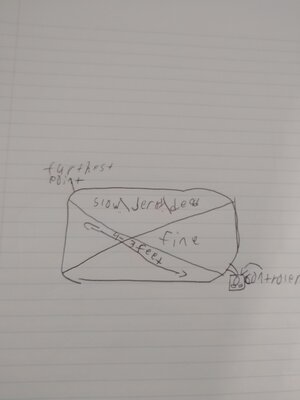
Feeders generally run to the furthest part of the track. I would use the same guage wire as the one going to your track from your power pack. A picture or drawing of your layout would help others recommend where to add feeders.
 
What are feeders? Are they extra wires from the controller all the way to the slow spot or are thet seperate things i have to go and find and buy?

Feeders are additional connections from your power wires to your track. I'm guessing you just have your DC power pack connected to your track at one spot, i.e. one wire goes to one rail, one wire to the other rail? A "feeder" would be another set of wires running from your power pack to another spot on your layout, where they connect to the track. You would then be supplying power to your track in two locations, and if there was a loose joiner or broken track between those two locations, you'd still be getting power to the whole layout.

Feeders are more critical in a DCC layout, where it's important to have a good, reliable digital signal throughout your entire layout. You'll see various recommendations for how many feeders to use, such as feeders every three feet, six feet, etc. Multiple feeders are not as critical in a DC layout--as long as the track is getting power, you're mostly good.

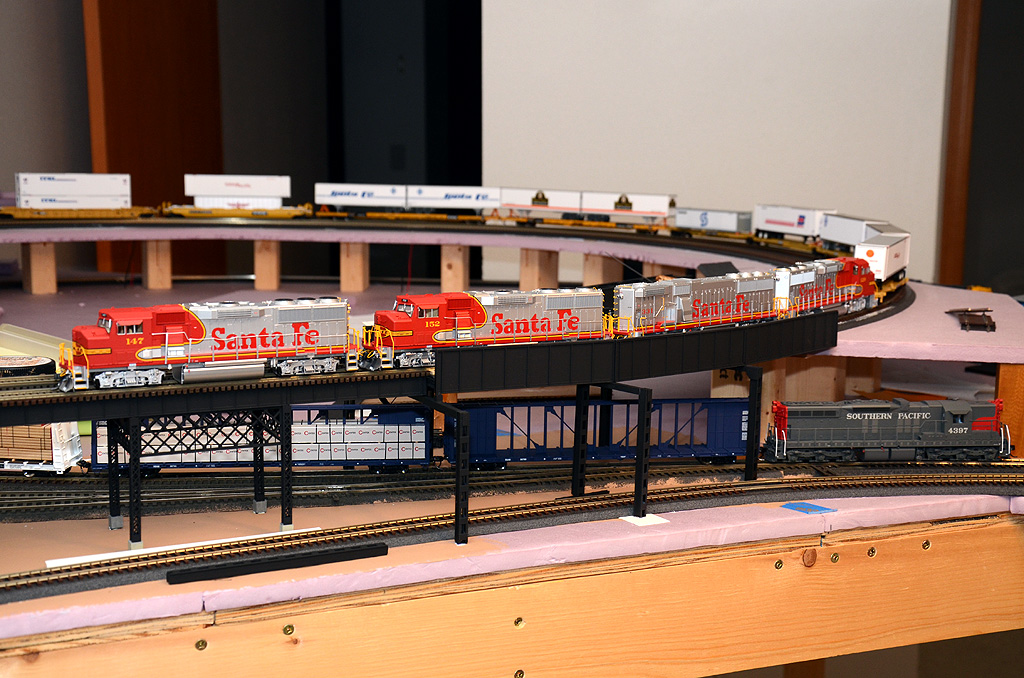
On larger layouts, the general practice is to have a track "bus" power line running beneath the layout. That's two wires carrying the current from your power source; every 3-6+ feet, you then have a small set of feeder wires going up from the track bus, through the plywood to connect with the track. Here's a picture of part of my layout (sorry it's the only one I could quickly find with an example of feeder wires). If you look carefully in the background underneath the trailers, you can see two sets of red and black wires coming up through the layout. Those are feeder wires connecting the track bus underneath to the upper level track, where they are soldered on.
49406880886_75a6fcf352_o.jpg


You didn't mention how large your layout is. If it's fairly small, then you don't really need to worry about feeders. But if the far end of your track is...say 8-12' away or more, you could consider adding a set of power wires out to the far end. It would just be another set of wires running from your power pack, underneath the layout, and connecting to the track over there. Just make sure each wire is connected to the same rail as the wires on the close connection. I use colored wire to help tell the difference. Red goes to one rail, black goes to the other rail.


What are feeders? Are they extra wires from the controller all the way to the slow spot
Yes. Not necessarily the slow spot, but to the furthest point from your original power hookup. That seems like the same place on your setup. You don't write what kind of track that you are using, but I am assuming that it is sectional track, that is a bunch of 9" pieces. If that's the case, you lose some power every time that you make a track-joiner (fishplate)-track connection.
i have to go and find and buy?
It depends. If you are going to use "terminal track" like this, then yes. You could also use terminal rail joiners like this. Or you could just make your own by soldering wire to a couple of rail joiners or to the track itself.

EDIT - Looks like Twinboy and Eric answered while I was typing.
 
Feeders are additional connections from your power wires to your track. I'm guessing you just have your DC power pack connected to your track at one spot, i.e. one wire goes to one rail, one wire to the other rail? A "feeder" would be another set of wires running from your power pack to another spot on your layout, where they connect to the track. You would then be supplying power to your track in two locations, and if there was a loose joiner or broken track between those two locations, you'd still be getting power to the whole layout.

Feeders are more critical in a DCC layout, where it's important to have a good, reliable digital signal throughout your entire layout. You'll see various recommendations for how many feeders to use, such as feeders every three feet, six feet, etc. Multiple feeders are not as critical in a DC layout--as long as the track is getting power, you're mostly good.

On larger layouts, the general practice is to have a track "bus" power line running beneath the layout. That's two wires carrying the current from your power source; every 3-6+ feet, you then have a small set of feeder wires going up from the track bus, through the plywood to connect with the track. Here's a picture of part of my layout (sorry it's the only one I could quickly find with an example of feeder wires). If you look carefully in the background underneath the trailers, you can see two sets of red and black wires coming up through the layout. Those are feeder wires connecting the track bus underneath to the upper level track, where they are soldered on.

49406880886_75a6fcf352_o.jpg


You didn't mention how large your layout is. If it's fairly small, then you don't really need to worry about feeders. But if the far end of your track is...say 8-12' away or more, you could consider adding a set of power wires out to the far end. It would just be another set of wires running from your power pack, underneath the layout, and connecting to the track over there. Just make sure each wire is connected to the same rail as the wires on the close connection. I use colored wire to help tell the difference. Red goes to one rail, black goes to the other

Its way more the 12 inches away it slows down on exactly half of the layout ill send a drawing


Affiliate Disclosure: We may receive a commision from some of the links and ads shown on this website (Learn More Here)

Back
Top