The D&J Railroad -- From Scratch

ModelRailroadForums.com is a free Model Railroad Discussion Forum and photo gallery. We cover all scales and sizes of model railroads. Online since 2002, it's one of the oldest and largest model railroad forums on the web. Whether you're a master model railroader or just getting started, you'll find something of interest here.


Started some work on the skirting were I finished the signal installations.
I'm doing an open house here for some of the local guys on 22 Dec and wanted to get some of the more delicate wiring stuff covered up.

I hauled in another 8 sheets of Masonite and 4 sheets of drywall this morning. Should have the drywall installed on the base structure by noon and then will work on hanging more Masonite around the operating edge.
 
Last edited:


Great video! Looking forward to further progress!!

If I may be a knitpicker for a moment-isn't your CZ underpowered for a longer than prototypical train(14 cars)??? Was it longer than the freights?

Your signals looked good!

Happy New Year!
 
Yes, I think it is. I can't find additional A or B units that match the existing power. I may have to just add a GP of sorts to help it out.
 
The sound of the F units echoing off the wall at about minute 6 works really, really well! Regarding extra Fs, the recent Bachmann D&RGW units run very well, have sound available, and could at least serve as stand-ins as third and fourth units.

I have a question. I notice that while you're following the CZ train with the camera, there are two or three other trains running. Do you just start them and turn them loose, or are you controlling them? Are you controlling the CZ while you follow it? Or are they on completely separate circuits? Or is there other interesting info you could provide? Thanks!
 
The sound of the F units echoing off the wall at about minute 6 works really, really well! Regarding extra Fs, the recent Bachmann D&RGW units run very well, have sound available, and could at least serve as stand-ins as third and fourth units.

I have a question. I notice that while you're following the CZ train with the camera, there are two or three other trains running. Do you just start them and turn them loose, or are you controlling them? Are you controlling the CZ while you follow it? Or are they on completely separate circuits? Or is there other interesting info you could provide? Thanks!

I haven't really considered Bachmann units. I'm not sure that they run at the same speed as the BLI units and I hate messing with speed tables.
When I was video taping, I had a DT402D in my pocket with the CZ on one dial and one of the frieghts on the other dial. The other trains were running on a second DT402R just in case they got into trouble.
I will probably do another video soon using a tripod and more dual aspects that will have to be edited together for the final product. One of the features that I really wanted to display was the operating signals. I passed by them a bit to quick while following the CZ.
 
Stewart/Kato made some nice DRGW F's in the same scheme, back in the 80's or 90's. Run great as long as the wheels are good.


For that matter, Athearn currently has Genesis D&RGW F3 A-B sets as rebuilt in 1950. These were regular CZ locos.
 
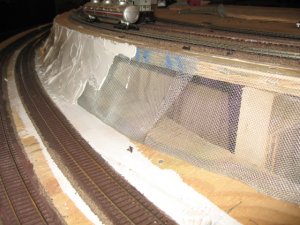
Been tuning some locos and troubleshooting others. Decided to start a bit of scenery today.
Stapled some screen to the plywood roadbed then smeared some plaster across it. I'll let this set up then I'll apply another coat and start working in the rock texture in sort of a rock strata form.

IMG_6236.JPG
 
Decided to push on with the rest of the signal system.
I shut down operations on the D&J Railroad to finish the work in power section 1. I installed the PM42, a BDL168 and an SE8C then rerouted the power and loconet cables for a cleaner application.
I'm planning up the power district layout and the position of signals this evening then should begin running wire to isolate the tracks into the power districts tomorrow while watching the playoffs.
The edge connectors by Acculite make this a much easier job to do.

1120141621.jpg


1121141146.jpg
 
Last edited:
That is the part of building a layout that scares me. The electronics. I know who to turn to when I need help now ;)
 
Ya work into the electronics a bit at a time. I had help from fcwilt to get this going. I have installed two sets like this on the other two section of the layout. It's getting easy to do now.
 
I'm with Kevin on this, I'm scared to death of trying that kind of work. Ken I'll be contacting you in the future I'm sure because I am going to try and at least put some working crossing gates in the new layout. I know I have had people say it is easy but.......
 
I don't even understand how the signals work. Is there some info on this somewhere?

There many ways to achieve signal control but basically you need devices that respond to the presence of trains in certain locations on your layout and send commands to other devices that display the desired colors on the signals.

In Ken's case the "brains" of the operation is a fairly popular computer program called Train Controller (TC) which, as its name implies, is use to control trains on model layouts.

The program receives input from devices, called "occupancy detectors", which detect the presence of trains in various sections of the layout called "blocks" - Ken uses Digitrax BDL164 devices. Based on these inputs the program controls the colors displayed by the various signals positioned around the layout via another kind of device designed to drive signals - Ken uses Digitrax SEC8 devices. Ken has configured TC with "logic" to process the inputs from the occupancy detectors and set the signals according to the way he wishes them to work.

The benefit of using a program like TC is that you are free to control the signals as you see fit, from something very basic to a full blown implementation of some prototypical signalling scheme.


Another approach to controlling signals uses dedicated hardware to process the input from the occupancy detectors and control the signals but this is far less flexible then using a computer program.


But controlling signals is just one feature of TC. It can control your turnouts, your trains, your turntables - just about any controllable device that you might find on a layout. TC allows manual control, semi-automatic control, fully automatic control of your layout and more. Clever folks have even figured out how to have TC drop off and pick up cars at the various industries that they have on their layouts.


On my layout one of my goals is to have engines leave the roundhouse, via a turntable, travel to the passenger yard, couple up to waiting trains at the passenger station and proceed around the layout, eventually returning the trains to the passenger station, uncouple from the trains and return to the roundhouse - all under control of TC. While this is happening I can be manually controlling a freight train and service the various industries that I will have on my layout.


To a large extent what you can do with TC is limited by your imagination and your wallet.

 
Wow, thanks for that great explanation. My layout will be very near my PC, so this sounds very interesting to me. I had planned to use Digitrax along with Soundtraxx. But that in itself is a fairly pricey setup. Do you still use the Digitrax controller in conjunction with TC? I see they offer a sound controller as well. Very cool.

But actually my question is the red and green light... what do they mean? I have never read up on the use of signals, or where they are placed on the layout and why. I have no actual railroad experience so I have no clue how they are used. I have always assumed they mean stop and go?
 
Last edited by a moderator:


I use the Digitrax DT series of controllers on this layout. Simplex and Duplex radio link. The Traincontroller software controls the signal lamps in the signal heads.
The three color aspect indicate; green = the next two blocks ahead are clear, yellow= the next block is clear but the block after that is occupied, red = the next block is occupied.
You can run your railroad in an absolute control or permissive. Absolute means if the light is red, the train must come to a stop. If you are operating permissive, the train may creep along on a visual observation for traffic ahead.
When you see two signal heads, one over the other, there is usually a turnout or crossover ahead. The top signal of three lights indicates the status of the track you are on as illustrated above if the turnout is set to continue that route. The bottom signal indicates the status of the track that the turnout will take you onto if it is thrown. The two conditions of a turnout are: closed = straight ahead and thrown = taking you onto the siding or crossover.
Sound systems are independent of the Traincontroller software.


Affiliate Disclosure: We may receive a commision from some of the links and ads shown on this website (Learn More Here)

Back
Top