Question about JMRI Operations

ModelRailroadForums.com is a free Model Railroad Discussion Forum and photo gallery. We cover all scales and sizes of model railroads. Online since 2002, it's one of the oldest and largest model railroad forums on the web. Whether you're a master model railroader or just getting started, you'll find something of interest here.


pmwtrain

Member
Hi, guys. Although my layout is still sometime from using this program, I downloaded it and began to enter some of the locations and cars to get a feel for it.

I have (or will have) a 5 track yard with two spurs with industries. A switch engine will be stationed here. My question is should I call these 5 tracks "yards tracks" or "classification/interchange tracks"? I'm not completely sure what the difference is between the two or how the program will treat each kind.

Thanks, all
 
I'm not at home so I can't see [or remember] exactly what I did with my own yards. But I would say, define two "locations", one of each type, and experiment a little to see which one gives you more flexibility.

Do you plan on using this software to generate manifest and switch list documents? Or will you actually be using it in "real time" mode to track the movement of trains on your computer screen?
 
Sounds just like yard tracks to me. I have tow yards on my point to point layout. with hidden staging tracks which also allow for continuous running.

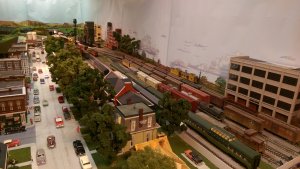
I will bring a train "on stage" from the hidden staging tracks into one of the two yards where it will be broken down and an outbound freight train will be made up to service industries along the main line. I also have industries in the yard areas where a switcher will serve the industries in the yard area. In this photo you can easily make out the three industries along the back drop. A freight station is hidden behind trees and I also have a fuel oil distributor and a warehouse that ships potatoes at the far end of the yard.

IMAG0879.jpg IMAG0807.jpg

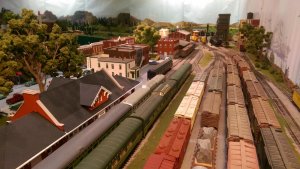
In this photo you can see the freight station with the potato warehouse behind it and you can also pick out the oil storage tanks next to the potato warehouse.

I would just call it a yard. A classification yard is usually at larger facility. Here's a for instance. Take a train coming out of a large city. It may have freight going to many parts of the country. When that train gets to one of the railroads classification yards, the cars from that train will be broken down into the classification yard, usually in a hump yard where the cars will be separated onto different tracks depending on wich city ot which part of the country they are going to. These cars will then be made into a train headed to the location that the cars were sorted out for. Hope this makes sense. Old grumpy Joe will hopefully give a better description of a classification yard.


Thanks, guys. Sounds like I should call them yard tracks first and see what happens.

Csx road slug, if you get a chance after you look at what you do with jmri, will you let me know what you call the yards and what kind of operations it provided for your yard crew? Thanks
 
Sure, no problem! Of course with family commitments this evening, I probably won't be able to get to it until ~8:00pm...
 
Thanks, Ken. But please no hurry. It doesn't have to be today or even this month :).
I still have a lot of track to lay, rolling stock and locos to buy before I can get into
operations. Just curious about the program.

Oh, by the way, I plan to use the program only to move the freight across the railroad,
I have no plans at present to connect a computer to the DCC system.

Thanks!
 
Carefully read the documentation because the type of track affects what the track can do. I think if I remember correctly that interchange tracks are where cars change for train to train and yard tracks are where cars are stored (the JMRI definitions of what tracks do doesn't match with the common ideas of what the tracks do). If you designate the wrong type of track it won't let you do certain things. Getting my head around that naming convention was source of a lot of confusion for me when I tried JMRI.
 
2) I defined a single, outrageously-long track of 20,000 scale feet, and put an underscore _ in the track name where the number would have been. This is so the yardmaster can have the flexibility to place incoming cars on whatever track they will fit on, and I avoid getting a "track is full" error when I try to build a train.

I tried that and it didn't work. The system then tried to drive every car on the layout to that track to try and fill it up.

Carefully read the documentation and then do EXACTLY what it says. If you don't its not going to work right.

From the JMRI Operations manual: "A yard is used to store cars and locomotives. "

Also from the JMRI Operations manual : "Yards are where cars and locomotives are placed for temporary storage. A spur can be an industry or any place where a car is loaded or unloaded. A classification/interchange track is used to exchange cars between trains, or to create a classification yard which is used to build trains. Staging tracks represent distant locations where trains can travel between to service the layout. "

So if your yard is where trains originate or terminate and cars get moved between trains, then it NOT a yard track, its an interchange track. If you leave it a yard track it probably will not work. Once again read the instructions. Then names of the track types do NOT conform to standard definitions, if you don't understand the differences it will NOT work right.
 
Obviously you and I use the JMRI tool differently.

I've gotten it to work perfectly FOR ME, for WHAT I WANT IT TO DO, which is to generate manifests and switchlists. I do NOT need it to follow trains in real-time, if that were the case I probably would have to do things differently than I do. That is why I asked the OP what exactly he was planning to use the JMRI tool for.

I will let you answer any more questions the OP has, since I have obviously not been using it the correct way this past couple of years.
 
[QUOTEI would just call it a yard. A classification yard is usually at larger facility. Here's a for instance. Take a train coming out of a large city. It may have freight going to many parts of the country. When that train gets to one of the railroads classification yards, the cars from that train will be broken down into the classification yard, usually in a hump yard where the cars will be separated onto different tracks depending on wich city ot which part of the country they are going to. These cars will then be made into a train headed to the location that the cars were sorted out for. Hope this makes sense. Old grumpy Joe will hopefully give a better description of a classification yard.][/QUOTE]

Chet, Ken, et. all:

Ok, a yard can be loosely defined as one or more tracks used to store, receive, classify or dispatch railroad freight, passenger, or non revenue equipment...:confused: Got that? :rolleyes:

In a major yard, such as Oak Island, in Newark, NJ, there is a receiving yard, a departure yard, and a classification yard, a shop yard, and a transfer yard, all under control of a single yardmaster. There is also an engine service facility with it's own related yard tracks under the jurisdiction of the Engine House Foreman. In a smaller yard, such as Browns Yard, in Old Bridge, NJ, there are a group of multi purpose yard tracks which are used for storage, classification, receiving and departure of trains. The last track over from the "Main" is along side a road, and is used for car repair, transfer / trans loading and other purposes as required by operation. There is also a single engine storage/service facility. It is also under the control of a single yardmaster.

As you can see from my description, both facilities are considered yards, and both facilities perform the same functions, in a similar manner. For that matter Sunnyside Yard, in Queens NY, performs the same functions for Amtrak, and NJT passenger operations. Translating that to model railroading, the only difference in yard operations is a correlation to the compromise we make when we attempt to shrink prototype operation to our scale of choice.

On my model railroad, for instance, the Reading Yard at South Chester, will consist of three tracks. It will function as an receiving/departure and running track, a storage track and an interchange track. The PRR Yard, will include a receiving track/departure/running track, two storage track(s), and an interchange track, plus an engine service facility, of at least one track. It will perform the same functions as the prototype yards, in a scaled down manner.

Classification is the switching of cars to place together, cars routed for a specific destination or customer. It could be a handful of locations or close to 100, depending on the location and size of the yard.

I have not tried to implement JMRI into my operation as yet, so I cannot comment on how it relates to what I described. But it should be flexible enough to work anywhere. If JMRI is used to create a scenario that reflects the operation of a prototype railroad, then it should be written to conform with standard railroad definitions. Most model railroads lack the space to have all sorts of separate use tracks, so yard tracks have multiple uses.

BTW, An interchange track is a track where cars are interchanged with another railroad, for example PRR to B&O at Bay View, (MD).



While all the definitions of prototype yards and track purposes are correct, the is not about how the prototype operates. It is about how software operates, and its not prototype software, its model railroad software written by model railroaders. One of the shortcuts in writing software like this is that attributes are attached to different things. Certain things do certain things. In another program the way it was originally written, an "extra train" could only be all loads or all empties (the programmer lived in western Canada and the only extras he ever saw were grain trains so he thought all extras were either all loads or all empties). It really doesn't matter what the prototype does or how the prototype names the tracks, its what the software developer named the tracks and what he says they do.

According to the JMRI developers and support people on the JMRI Yahoo Group who helped me when I was trying to set up JMRI on my layout, JMRI has certain attributes attached to the track type. In my experience, when I didn't abide by those restrictions, it didn't work as expected. When I changed it to conform to the restrictions, it seemed to work.

If somebody has done something different and uses JMRI successfully, I concede the floor to their understanding and expertise. While I have gone far enough to get JMRI to work on my layout, I didn't use it for regular op sessions on my old layout and don't plan to implement it on my new layout.
 
On my model railroad, for instance, the Reading Yard at South Chester, will consist of three tracks. It will function as an receiving/departure and running track, a storage track and an interchange track. The PRR Yard, will include a receiving track/departure/running track, two storage track(s), and an interchange track, plus an engine service facility, of at least one track. It will perform the same functions as the prototype yards, in a scaled down manner.

Cool, another Reading modeler, I used to live in Ridley and have studied the RDG through the Eddystone/Chester area. I currently model the RDG/P&R Wilmington & Northern Branch.
 
Dave: Ridley, eh? Cool. I grew up at E. 3rd & Upland, and had a clear view from my front porch, of the operation of both Railroads. I also walked virtually every inch from the Darby Creek Movable Bridge to the Chester Creek Movable Bridge. In later years, as an Engineer, I ran jobs out of Darby Creek, and Market Street, as well as Stoney Creek and Thurlow. (I'm PRR/PC, btw.). I left the area in 1979.

A couple of years ago, I decided to try and model the Chester & Delaware River (RDG), as well as the South Chester Branch (PRR) and the Chester & Philadelphia Branch (PRR) in the 1960s. The focal point of the layout, is the (no longer movable), Chester Creek Movable Bridge., The Reading being the single direct line, with staging at Leiperville and Marcus Hook, The PRR a divided operation, with the C&P staged at Eddystone, and the South Chester Branch staged at Stoney Creek.

W&N Branch, Eh? Dave, Would you by any chance the fellow who focused on operation and structures at Coatesville, and Lukens Steel? There are parts of the W&N that I'm familiar with but mostly on the Wilmington end. That's a neat and scenic branch.
 
At one point I acquired a conductor's wheel report book for a conductor on the AD-DA runs back in the 1930's (Allentown to Darby Creek and return). Used mostly M1sa's (2-8-2's). My layout tries to capture the W&N from Wilmington to Birdsboro, so I had/will have parts of Coatesville, Wilmington, Montchanin, Kentmere, St. Peter and Birdsboro. I say "had/will have" because I moved so had to tear down the previous incarnation and I am rebuilding it in a new and improved location.

Back to the topic, the "wheel report" was a book the conductor's kept that listed, in standing order, every car in the train and what was in it. It was handwritten. The conductor would get a list of the train (either given to him or he would have to walk the train) and then using the waybills, hand write the list into his wheel report book.
 
I find the concept of a Conductor's wheel report book fascinating. Sort of explains why we still "Booked" trains in the late '60s. The PRR used a Freiden Key punch program to generate waybills, bills of lading, and wheel reports, which were printed on a multi copy form. Conductor got one copy, another copy was saved in the file. The "computer" also generated a tape which was transmitted by teletype to the mainframe computer at 32nd St, in Phila. All other paperwork, was still hand generated.

The W&N had a group of fascinating stations along the line, as I recall. Pretty much followed the Brandywine for quite a distance. In the vicinity of where the W&N crosses Route 1 in Chadds Ford, PA ., the PRR Octororo Branch crossed the W&N at grade, the Automatic Interlocking was known as Chad. PC ended service after Agnes washed much of the railroad away, but there were shortline operators that still operate portions of the Octororo, as well as the W&N.
 
Thanks all for the feedback. I'm leaning toward classification tracks now:rolleyes:
Where can I find the documentation you guys speak of? I'm sure reading that
would help me.

Thanks
 
Basic operation is pretty straightforward if you follow the instructions, its the little tweaks and exceptions that take expert advice. I tried several other computer list apps, but JMRI was the one I was most successful with and its FREE. Full disclosure: I was able to get about 75-80% of my operation dial in, but I could see where getting the last 20-25% would take more effort than I was willing to put into it, so I have stayed with car cards. But if you want a computer based list program, its an excellent choice.

Here is a link to a thread on another forum where a guy setup his JMRI for a fairly simple switching layout:

http://model-railroad-hobbyist.com/node/27829


Thanks for the links, Dave. I'm sure familiarizing myself with those things will get me on the right track (pun intended):o


Affiliate Disclosure: We may receive a commision from some of the links and ads shown on this website (Learn More Here)

Back
Top