ModelRailroadForums.com is a free Model Railroad Discussion Forum and photo gallery. We cover all scales and sizes of model railroads. Online since 2002, it's one of the oldest and largest model railroad forums on the web. Whether you're a master model railroader or just getting started, you'll find something of interest here.
Hey fellow modellers , so seems I have a cataract in my good eye and I’m legally blind in my other eye . When I’m on the site the white background really makes it hard to read about all the ongoing my fellow modellers are involved with. I have learned about the show reader function that works for many sites and sometimes only in certain articles but I’m wondering has anyone or is anyone aware of something or someway to change the background to dark or black so it’s white text on black? I use an iPhone and iPad . Thanks
Hey fellow modellers , so seems I have a cataract in my good eye and I’m legally blind in my other eye . When I’m on the site the white background really makes it hard to read about all the ongoing my fellow modellers are involved with. I have learned about the show reader function that works for many sites and sometimes only in certain articles but I’m wondering has anyone or is anyone aware of something or someway to change the background to dark or black so it’s white text on black? I use an iPhone and iPad . Thanks
My daughter is legally blind and LOVES the apple products for their accessibility features. Yes, there are features for your ipad and iphone. Unfortunately, I do not know them. But when next I see her, I will ask. In the meantime do some exploring and searching on Apple accessibility for low vision users.
Using Firefox browser there is a setting in my address window called "toggle reader view" where it allows you to set your background to 4 values including a dark. I never use Internet Exploder so I don't know about it. Having issues myself, sorry for your circumstances. Using Win 10 here.
Hey fellow modellers , so seems I have a cataract in my good eye and I’m legally blind in my other eye . When I’m on the site the white background really makes it hard to read about all the ongoing my fellow modellers are involved with. I have learned about the show reader function that works for many sites and sometimes only in certain articles but I’m wondering has anyone or is anyone aware of something or someway to change the background to dark or black so it’s white text on black? I use an iPhone and iPad . Thanks
In settings under Display and Brightness is a light and dark setting. Just click on that, I think you’ll find it useful. I also have played in the Accessibility settings to darken the brightness
As for the cataract. Getting them removed was by far the best thing for my sight ever.
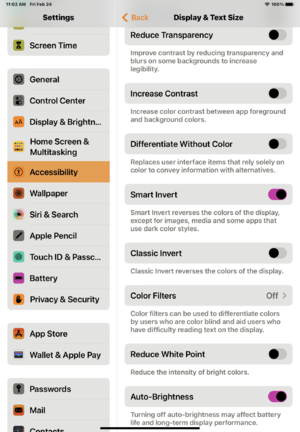
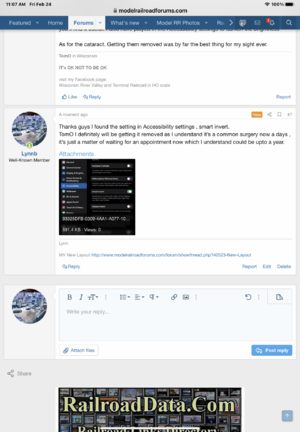
Thanks guys I found the setting in Accessibility settings , smart invert.
TomO I definitely will be getting it removed as I understand it’s a common surgery now a days , it’s just a matter of waiting for an appointment now which I understand could be upto a year.
Using Firefox browser there is a setting in my address window called "toggle reader view" where it allows you to set your background to 4 values including a dark. I never use Internet Exploder so I don't know about it. Having issues myself, sorry for your circumstances. Using Win 10 here.
Jeeze @Lynnb I too am sorry to hear about your sight problems. Hopefully you can at least get that cataract removed "soon" and not have to wait a ridiculous amount of time.
Jeeze @Lynnb I too am sorry to hear about your sight problems. Hopefully you can at least get that cataract removed "soon" and not have to wait a ridiculous amount of time.
Cataract surgery is replacement of the lens with a new one of a synthetic optical material. My girlfriend had both eyes done last summer with good results. However our eyes focus by the muscles changing the shape of the lens and the replacement is stiffer so reading glasses or progressives are likely needed for close up work. Good luck with this, it can be a real benefit!
Back in the good old days of Windows 3 one could set the background to any color. Some folks set this to black on black which made all the text invisible. The cure such as it was involved contacting a tech rep who would lead you through the keystrokes (since you couldn't see anything) in sequence to change this back to something useful!