JasonTrain
New Member
I used to be a big fan of XTrackCad (http://www.xtrkcad.org) and it had its challenges at times, became a bit of a turn off. I've since begun using SCRAM (http://www.scarm.info/index_en.html), and for me it’s just been a better software product.
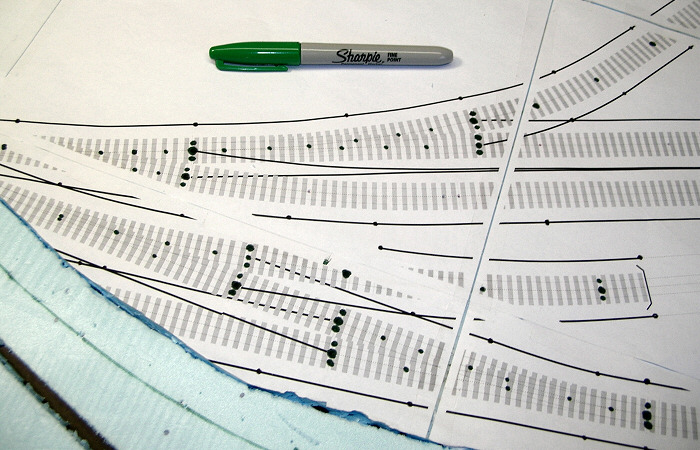
One feature it has is the means to print your layout in “real scale”, then use these prints as templates on your foam board, plywood, etc.
This is where I appear to have an issue I didn’t really think through. Curious on the ideas . . .
I’ve taped together my 50 some odd sheets of 8.5 x 11 paper to form my 8’ x 4’ layout. It looks great, I was shockingly impressed as it even allocated space for printer boarder on paper limitations. So I lay this track-plan down on my board and I started, just for size and testing, putting down some of my turnouts, Everything was lining up just perfectly, again really surprised (pleasantly).
Here is where I fell short, I don’t mean for my template to stay on my board, I’d like to use it to lay my track but then remove the paper template. I have been using pins to hold track down, again this is just testing.
Any suggestions on how to accomplish this? I want to use the template as it is “precise” regarding where I put my track, but I want to remove the white paper template once the track is down, I feel like a chicken before the egg type scenario.
One feature it has is the means to print your layout in “real scale”, then use these prints as templates on your foam board, plywood, etc.
This is where I appear to have an issue I didn’t really think through. Curious on the ideas . . .
I’ve taped together my 50 some odd sheets of 8.5 x 11 paper to form my 8’ x 4’ layout. It looks great, I was shockingly impressed as it even allocated space for printer boarder on paper limitations. So I lay this track-plan down on my board and I started, just for size and testing, putting down some of my turnouts, Everything was lining up just perfectly, again really surprised (pleasantly).
Here is where I fell short, I don’t mean for my template to stay on my board, I’d like to use it to lay my track but then remove the paper template. I have been using pins to hold track down, again this is just testing.
Any suggestions on how to accomplish this? I want to use the template as it is “precise” regarding where I put my track, but I want to remove the white paper template once the track is down, I feel like a chicken before the egg type scenario.