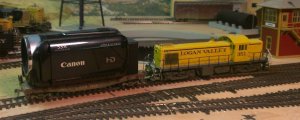
Ride-Along Camera?

ModelRailroadForums.com is a free Model Railroad Discussion Forum and photo gallery. We cover all scales and sizes of model railroads. Online since 2002, it's one of the oldest and largest model railroad forums on the web. Whether you're a master model railroader or just getting started, you'll find something of interest here.


KB02

Well-Known Member
For those of you who have created ride along videos, what do you use for a camera? I've pretty much exhausted the options that I have by creating tunnels (My camera's are all too big to fit through the tunnels). I'm not looking for any kind of super high definition movie camera, just something cheap and small enough to ride along on my HO layout.
 
That's the same problem I have. My camera is too large to fit through tunnels. Look for a Go Pro camera.

Camera.jpg
 
GoPro's are really nice, but pricey.

Actually, I just did a little research online and found the 808 Keychain Spy Camera. I found one on Amazon for under $6.00. I would like to get a GoPro some day as I am an avid motorcyclist as well, and it would be great to have one of them along for that, too. BUT, for Six bucks, I don't mind taking a quick gamble on this keychain thing first.


I saw a couple of Go Pro cameras on Amazon in the $55 range, but for six bucks, it's worth a try. I was lucky that the only track I can't travel on with the camera is my hidden staging tracks. Nothing to see there.
 
I have a mini cam (bought from China) that is about an inch X inch X .5 inch with a resolution of 720 dpi (I think). Cost me the huge amount of $15 from memory (including shipping). Granted, it took a week or so to get here and I was skeptical BUT, it is what I used to video all of the G Gauge Locomotive/Engineers views.

It is called a Mini Cam corder Y2000

Y2000-1_zpsdqabi9qv.jpg


Obviously not as good as your Canon (or mine) but is ideal for what you want to use it for.
 
I bought this on-line from B&H Video.
It can be toggled to shoot upside down or right side up. You watch the recorded image on your smart phone by wifi link from the camera. It can record for over 3 hrs in HD and has great audio quality.
I made the plastic adapter for it to ride on a flat car without falling off. I just used some duct tape rolled up and stuck to the bottom of the plastic adapter to hold it in place. It fits well within the HO scale freight profile template/gauge. One thing I would recommend though, use plastics wheels on the flat car otherwise the metal wheels will produce to much sound.

IMG_6813_zpsmvgin71s.png


IMG_6812_zpsreqs9r8s.png


Here is one of the videos that I shot with it.

[video=youtube;HnUywHd-tN4]https://www.youtube.com/watch?v=HnUywHd-tN4[/video]
 
Last edited by a moderator:
Terry, what is that weird waviness on the edges of your video? Is that just this video, or is it the way all videos cone out off of that camera? (I'm not the only who sees it, right?)


Ken,

Darn, that's a nice cam corder!

KB02,

I don't see any wave mate - you've been in the train room again haven't you! :cool:

Okay,seriously, that "wave" you see is caused by the wide angle the video is being shot at - it is almost like using a "shit - I forgot" ... nope just remembered - Fisheye lens.

Basically, the wider the angle of the lens distorts the end result, such as you see (and no one else does) in Terry's video :)
 
KB02,

I don't see any wave mate - you've been in the train room again haven't you! :cool:

Okay,seriously, that "wave" you see is caused by the wide angle the video is being shot at - it is almost like using a "shit - I forgot" ... nope just remembered - Fisheye lens.

Basically, the wider the angle of the lens distorts the end result, such as you see (and no one else does) in Terry's video :)


He's not talking about barrel distortion from the lens. He's talking about the rolling shutter effect (a.k.a. the Jello effect) which causes wavy distortion due to the type of rolling shutter that the camera uses. Each frame is recorded by scanning line by line, so if the camera is moving, the camera is in different positions as different parts of each frame are recorded, thus the distortion.
Look at the ceiling near the beginning of the movie and you'll see some really bad waviness.

Here's a site discussing it.
http://www.flitetest.com/articles/vibrations-and-jello-effect-causes-and-cures

You can avoid the Jello effect by getting a camera with a global shutter. Finding a small inexpensive one will probably be difficult.

Steve S
 
Last edited by a moderator:
Terry, what is that weird waviness on the edges of your video? Is that just this video, or is it the way all videos cone out off of that camera? (I'm not the only who sees it, right?)

Nah, it's there. That was shot at 1080 setting when I first got the thing. Shooting at 720 or whatever the little switch says seems a little better.
https://www.youtube.com/watch?v=YMQ4gc1PkeY

I'd rather have a Mobius mini cam. SWMBO said no.

Terry in NW Wisconsin
 
And the $5.34 video camera has finally arrived from China. I immediately did my best to decipher the Google-Translate directions and started taking a few test videos. At first I thought that the camera was busted or that I screwed it up somehow as the videos were not coming through at all. Turns out the problem was that I use a MAC and the format it shoots in, .AVI, is not really supported well by Quicktime. The videos work just fine in my work PC.

Anyway, is what a video camera that costs less than a meal at McDonalds will look like.
[video=youtube_share;UrqS1cVtUec]https://youtu.be/UrqS1cVtUec[/video]

I know I need to work on my lighting, but I didn't think it was THIS bad...
 
Thanks for the video. I did manage to get an idea of the layout. Appreciate it, but I think the camera could possible need a bit of upgrading. I don't know if a different format would make a lot of difference. I have some video I took as an experiment and have them on quick time and they are almost as good as downloads I took directly off of my HD camcorder

Maybe a happy meal would have been a better deal.
 
Maybe a happy meal would have been a better deal.

HA, HA, HA!!!!! You know, I think you might be right. ;) There is some wonky-ness with the upload to YouTube that I am trying to address. There is actual sound in the video that it captured. I'll have to see if I can convert it from .AVI to .MP4 and then upload.

 
This is an improvement over the first one, but it appears that the camera sure needs a lot of light. Now at least I have a lot better idea of what your layout looks like.
 
You need to check the wave form of the audio track. I think if you dig around on YouTube you can find a wave form converter.
When the video first started I thought it was going to break into some kind of rap music. 8-)


Affiliate Disclosure: We may receive a commision from some of the links and ads shown on this website (Learn More Here)

Back
Top