
power pack controller

ModelRailroadForums.com is a free Model Railroad Discussion Forum and photo gallery. We cover all scales and sizes of model railroads. Online since 2002, it's one of the oldest and largest model railroad forums on the web. Whether you're a master model railroader or just getting started, you'll find something of interest here.


cfinn

New Member
Hi all,

just signed up and have a few questions.

currently i have an old life like power pack from the 1980's.

i bought a DCC sound bachmann engine and am running it on EZ steel track.

of course i dont have much sound control and it blinks a lot from voltage spikes i guess.

i would eventually like to go to DCC with sound and nickel silver track but in the near term i am thinking it would be a good investment to buy a better power pack. i am sure anything today is better then the one i have.

i cant make the air horn blow cause this old one doesnt have any low end voltage, it just takes off and goes right to the diesel noise.

thanks.
 
Hi Cfinn, welcome. I would suggest, if you can, to replace the Power Supply and the rails. Nickel Silver rails will give you much better conductivity. A new Power Supply will do a much better job controlling the engine too. The MRC Tech series would be a good start.
 
While others may recommend an NCE DCC system, I'd go with the MRC Tech 6 6.0, at least for now. You can run either DC or DCC with the hand-held controller, get a reasonable number of sound functions, and still be able to run some DC locomotive (NOT simultaneously, however) if you should stumble on on or more. OTOH, if you plan to go exclusively with DCC and sound, then the NCE setup might be more economical in the long run. That is, instead of buying the Tech 6 6.0 (amp) and going to the NCE equipment later. Also depends on the size of your layout.


That for the responses so far.

so are you saying i cannot run a regular DC loco with the MRC system?

i ask because i do also have an older Athearns GP-38 that i like to run on my track also.

how can you check how many speed steps a control pack has?

thanks again, this is a great hobbie, just shocking how expensive the quality items can be when compared to when i was a kid.
 
That for the responses so far.

so are you saying i cannot run a regular DC loco with the MRC system?

i ask because i do also have an older Athearns GP-38 that i like to run on my track also.

how can you check how many speed steps a control pack has?

thanks again, this is a great hobbie, just shocking how expensive the quality items can be when compared to when i was a kid.

The Tech 6 6.0 can switch between DC and DCC. Since DC is analog, you essentially have an infinite number of "speed steps" between 0 and 12 volts DC. In DCC mode, the number of speed steps can be set by programming the individual Configuration Variable (CV) that controls the particular locomotive. Which CV should be listed in the manual that comes with the locomotive, and how to program it is shown in the manual that comes with the Tech 6. The main limitation with the Tech 6 6.0 is that you can only control 6 locomotives at a time (by switching to each loco's assigned address, then addressing a different loco and controlling it). Also, the Tech 6 only can use "short" addresses, so you can't use the number of a Burlington E-unit, which had a 4-digit number starting with 99XX. It could only be addressed as 001-006. A more flexible controller, for example NCE can use the long address and a few other things. But for some of us with small layouts and who mainly operate alone, the Tech 6 is adequate. If you run two or more locomotives on the same train, such as an A-B-A diesel set, you can set the speed CV for all the engines in the same lashup to the same settings, which is called "consisting". The Tech 6 6.0 has a 6 amp capacity, so you should have plenty of "juice". If you have a larger layout, you probably would need to run large bus wires around the layout, with feeders to each "power district". As I have my layout wired in blocks for DC operations, I treat each block as a separate power district. It's not as complicated as it sounds.

The main caveat is be SURE that the Tech 6 controller is in DC mode when operating a DC motor, or you will hear a loud hummmm! If left on long enough, the hum will stop, accompanied by smoke and the smell of burning insulation from the loco's motor! :eek::( DCC equipped loco will be fine if in DC mode, but you won't be able to access all of the functions that you can in DCC mode. (Since I have a LOT more DC engines than DCC, and have difficulty walking and chewing gum at the same time, I have a separate DC power pack from MRC, which is wired to one side of a DPDT toggle switch on my control panel. The Tech 6 is connected to the other side of the toggle switch. Since I only run one train at a time, I throw that switch to whichever type motor is aboard the locomotive. Since you are probably younger and less confusable, you won't need such a lashup!)
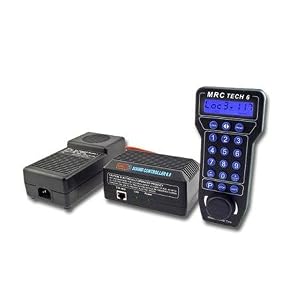
Hope this helps.
 
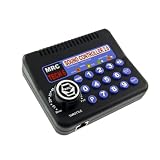
is this what the unit looks like?

41eRGMtC1dL._SL500_AA300_.jpg
or this?
 
cfinn;298166 [IMG said:
http://ecx.images-amazon.com/images/I/41eRGMtC1dL._SL500_AA300_.jpg[/IMG]or this?

The three-part unit is the one you want, the Tech 6 6.0. It can handle 6 amps and is much more flexible than the plain Tech 6, as it will give you readouts on the speed setting, CV values and programming numbers when you program CV's, etc. You can also program the 0-9 buttons to do different things. It will display the speed step numbers as you rotate the throttle, whereas on the smaller unit you only have the index numbers on the dial. A bit more costly, but a much better choice. The hand-held control unit is tethered, but you can get the longer cable (I think you may need to ask for it, but can't remember). I'd buy one of those plastic hanger thingies that can be mounted to the side of your layout, to set the hand unit in when you aren't using it. NOT a requirement, but handy. I think I got mine from Trainworld or someplace.
 
Last edited by a moderator:
Trailrider, Just ordered it online, my wife is not going to be happy :) i got it for 187 dollars. I cant wait to get it and install it, i will let you know what i think but your right, might as well spend the money and get what will work then buy something cheaper and wish i would not have.
 
Trailrider, Just ordered it online, my wife is not going to be happy :) i got it for 187 dollars. I cant wait to get it and install it, i will let you know what i think but your right, might as well spend the money and get what will work then buy something cheaper and wish i would not have.

Well, it could get costly when she finds out... Might cost a new dress or a pair of shoes, etc. OTOH, if you can sneak it into the house without her knowing, at least until you are ready to show her how your DCC loco can ring its bell, sound its horn, etc. She might smile...after her own purchases, of course! ;)


Okay, i need some help here.

I got the controller yesterday and hooked everything up. It only seems to run in DC with my Bachmann S4.

I have power to the pack and the sound control (green power light on). Link light is not on, it does blink when i give the train a command though.

screen says "loco (arrow) then 000" I have tried to program the address by pushing loco button then #3 then enter and it just reads the screen stated above.

I have also tried to reset the locomotive by using the 9,9 command.

Finally i took the pickup track piece and just set the loco on thinking maybe it was just a problem with the track. no change same issues.

So...what am i doing wrong here?:confused: it was heartbreaking not to be able to run the airhorn after messing with it for almost 4 hours last night....:(

the unit looks like it will stand the test of time, very solid, only the controller itself seems on the cheap side. i like the cooling fans, do they ever run on your unit?

also, what is the correct way to connect the wires to the track? any pics would be helpfull.:confused:

thanks.
 
I presume you have the Tech 6 6.0, with the separate hand controller. Also, I presume your S4 does have DCC and sound decoders. (I have one, but it is in DC only.) If the S4 has DCC + sound, then do the following:
To change from "Loco" (DC) to "Loco 003" (the default value), Press LOCO and then SHIFT. You should then see LOCO 003, which is in DCC mode. Press SHIFT 9, 9 to reset the locomotive to the factory #3 setting.
So far as connecting the wire to the track, just connect the two wires from the power pack, per the instructions. If you layout has return loops, etc., you could have a shorting problem. Otherwise, it should be straightforward.

Hope this helps.
 
Last edited by a moderator:
OKay, i will mess with again tonight but i tried everything and it just kept defaulting back to Loco...

so i just push loco and wait and it switch to DCC? does anything on the screen indicate which mode it is in.

it is a MRC tech 6 6.0, i bought it on your advice :) that is was a worthy unit. now i just need to get it working.

do i need to keep my old controller to use the turn out switches? i noticed it does not have an AC connection like my older one does.

any other advice on how to use/program the controller? where do use set your momentum controls?

thanks again Trailrider.
 
By trailrider;

Well, it could get costly when she finds out... Might cost a new dress or a pair of shoes, etc. OTOH, if you can sneak it into the house without her knowing, at least until you are ready to show her how your DCC loco can ring its bell, sound its horn, etc. She might smile...after her own purchases, of course! ;)
Let's just hope she doesn't ring HIS bell!!!:D
 
"so i just push loco and wait and it switch to DCC? does anything on the screen indicate which mode it is in."

Press LOCO then SHIFT. The readout should read LOC 003 and you should be in DCC mode.

Yes, you will need your old controller or at least a "straight" AC or DC power source for your turnouts.
 
okay, got it working Friday night, must have been the beer drank during the set up and install that got me confused by the time I got around to testing it.

I am very happy with this unit. the controls are great and i havent even been able to get the power pack to feel warm to the touch after running it for several hours. my old controller used to get hot and eventually time out and shut off after that much time (very old life like or bachmann unit).

just a few more questions so I can get the most out of this MRC tech 6 6.0

Is it possible to get momentum controls on a DC loco?

What is back EMF? does this give speed control when going up and down grades? (my sounds like a slot car coming down the hill). i would like to run it at a constant speed at least with my DCC S4.

Thanks for all the help. My wife wasnt to mad, more concerned that now i will be spending even more time in the basement with my model trains though. :rolleyes:
 
"Is it possible to get momentum controls on a DC loco?

What is back EMF? does this give speed control when going up and down grades? (my sounds like a slot car coming down the hill). i would like to run it at a constant speed at least with my DCC S4."

Glad your Tech 6 6.0 is working for you. I am afraid my "expertise" is quite limited. If I read the instructions that came with my 6.0 correctly, the paragraph on "Standard Mode", at the bottom of page 1 and continuing to the top of page 2, tells how to program acceleration and deceleration rates. It says that once programmed, these rates will be stored in the base until you change them. I think those figures will apply to all DC locos being operated by your Tech 6, not just an individual DC loco.

I tried to look up "Back EMF" on Google, and get a fairly complicated answer that I can probably understand if I study it some more. The problem is figuring this out for model railroad operation. I think it refers to the fact that the back emf can be detected by the controller and adjusts the speed of the motor. Your DCC S4 should have come with some programming guides for the various Configuration Variables (CV's) that can be programmed by your Tech 6 6.0. I know that different decoder manufacturers have slightly different CV's, so you need to look at the brand of decoder installed in the S4. It may be that you will have to download the complete instructions from the decoder manufacturer's website. You may have to play with the values you program into that loco to get the desired performance. Since all model railroad locomotives use DC motors, the decoder in a DCC-equipped locomotive converts the constant voltage AC to the track into a pulse width coded DC signal fed to the DC motor. If a straight DC loco is on the track with DCC switched on, you will hear a hum, which is a warning to turn off the DCC, or the hum will stop, probably with smoke coming from the engine! :( OTOH, a DCC decoder-equipped loco will work on straight DC. It will probably require the speed control turned up a bit higher before starting, and you won't be able to access some of the DCC options other than, maybe, the engine noise, bell and whistle.

Hope this helps.
 
Well i had my first bad track delrailment last night :( of course i stepped out of the room for about 2 minutes when it happened. i came back to the room and saw the wreck and after looking closer saw smoke and plastic starting to burn. :mad:. i grabbed the loco that had derailed on a turn out at just the right spot to keep power to the engine and literally 1 of the train wheels fell off and the plastic truck cover was melted along with the gear on the drive wheel.

how dangerous is this? Have other people hadt this happen. thankfully the loco was the one i bought used and retooled and i had spare parts. i got it working again and moved the turn out to my small yard track since it doesnt get much use and the way the plastic melted formed a ridge where the plastic meets the rail.

on a side note to my earlier post, the cooling fans on the power pack work just fine if the unit gets hot. :rolleyes:

does this usually ruin a locomotive? anybody every heard of a fire actually starting from a situation like this?
 
Hopefully this loco wasn't your S4. The one thing I kind of have with DCC is that with the higher AC voltage constantly on the rails, if you have a derailment that results in a short, this can happen. Was this a DCC loco? I've had problems with four brandnew Proto2000 E-units that had bad axles resulting in wobbly wheels that caused derailments resulting in short circuits. This caused the gearbox cover to melt!:( On three others, it fried the decoders! :( I was able to get them repairs...at a cost about the equivalent of one new unit. I keep a sharp lookout for wobbly axles! I've read that a lot of folks recommend replacing the wheel/axle/gear assemblies on the P2k units (at least some of them) with NorthWest Shortline parts. So far, I haven't had to do this...but time will tell.

As to whether this could cause a fire that could spread, I suppose it could happen! But I don't leave my equipment running when I'm out of the room. Actually, I'm more concerned about damage to the locomotive, and try to get to the powerpack switch or the derailed engine to get power off ASAP. These things do happen, I guess.

Hope things go better for you...


Thankfully it wasnt the S4, it is an old Athearns GP-38 i bought second hand and i was running in DC mode.

Yea, I knew it was a bad idea to leave it unattended but it was running so smooth around the layout i thought, awe it will be okay for a minute...:o

anyhow, it could have been worse, i caught it just as it was starting to do serious damage, another minute or two later and I am sure the engine would have been burned up beyond repair as well as the track section.

I did just replace the wheels on the loco like 2 weeks ago when i retooled it. i noticed the replacement wheels from Athearn were a bit smaller and a deep colored shiny metal, they were better then the orginal wheels that were on it. i did gauge the wheels with an NMRA gauge. the wheel set itself does have play in it back and forth though. Not sure how to fix that through.


Affiliate Disclosure: We may receive a commision from some of the links and ads shown on this website (Learn More Here)

Back
Top