Peco Flex Track?

ModelRailroadForums.com is a free Model Railroad Discussion Forum and photo gallery. We cover all scales and sizes of model railroads. Online since 2002, it's one of the oldest and largest model railroad forums on the web. Whether you're a master model railroader or just getting started, you'll find something of interest here.


ScottoT

Member
I've got a question about making curves with Peco 36" flex track (probably any other brands as well).

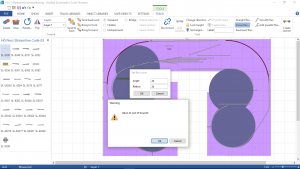
I'm trying to plot my layout using Anyrail program, and the smallest radius turn the program is allowing me to create is a 48" radius curve = a 96" circle which is far too big for my 16.5' x 11' space.

What I am attempting to do is make a curve so that my long cars- primarily Walthers and Intermountain auto racks can navigate a minimum 24"radius curve as recommended. I have in my basement now, a box and a half of the Peco Flex track and that is what I thought I'd be able to use for those curves, rather than piecing together the 16 or so 24" 22.5 degree curves for each of the 90 degree curves I will need to make.

Can Flex track be curved to make such an angle?

Thanks in advance.

Scott
 
Last edited by a moderator:
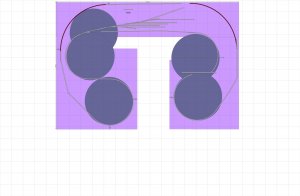
16 x 11 Basement layout planning.jpg
Here you can see approximately what I am trying to do with my track planning.
 
Scott - You didn't really ask a question so I will assume you want to know how to lay a curve out. I don't use any computer programs to do my layout, so I am going to describe an "old-fashioned" way to lay curves out on the layout.
I got a cheap wooden yardstick from the lumberyard and drilled holes at the 1" mark and then at every inch from 19" to 35". I then got a piece of thin cardboard 36" x 72", I used a piece that I obtained from a die-maker at work. I then set the yardstick up on a sheet of plywood and fixed the 1" mark in the center of the bottom of the long side, I used a small nail. Using a pencil, I then traced a mark every 2" from 18" to 34" and cut out the semi-circle pieces. That gave me eight patterns that enabled me to then lay out on the layout and trace circles from 18" to 34". While I mostly used 30" to 34", I still could have made smaller tracings if needed.
Just because the manufacturers recommend 24", that doesn't mean that you cannot go greater, which I would recommend if you have enough room. That's one advantage to using the templates, you can lay them out and see what works first. If you don't have access to a piece of cardboard, you might have room to still use the yardstick and pencil directly on the layout. Another option is to use the backside of gift-wrapping paper.
Hope that this helps.

Willie


Are you by any chance using the O gauge scale, or Garden? There's something very wrong here if the lowest radius it will permit you to lay in HO is a whopping 48" radius.
 
Are you by any chance using the O gauge scale, or Garden? There's something very wrong here if the lowest radius it will permit you to lay in HO is a whopping 48" radius.

I've double checked and ensured that I am using HO scale Flex track, and the program won't allow me to do a 24" radius with 36" HO flex track.

2017-08-07.png Thank you for the suggestion, that was something I very easily could have messed up with.
 
I'm no expert (or have ever used one of these plannig aids) but you have specified the track type and scale. The only thing I can see possibly incorrect is the angle, if that figure is the number of degrees in the curve. What is drawn on the plan for the corner curves are 90 degree angles, not 45.
 
If at all possible use sectional track pieces on your curves. You know the radius, get the pieces. Laying flex where sectional CAN be used is asking for trouble, go with the sectional on the curves.
 
I'm no expert (or have ever used one of these plannig aids) but you have specified the track type and scale. The only thing I can see possibly incorrect is the angle, if that figure is the number of degrees in the curve. What is drawn on the plan for the corner curves are 90 degree angles, not 45.

Good catch, and this could very well be the central problem. Even so, I see also two very sharp curves leading to the two lower 'circles'...those aren't going to be especially helpful to rolling stock.
 
Scott,

Couple of things that might help. I am not at my computer so this is going off memory.

In settings you need to assign a minimum radius, I set mine to 18" to start when just throwing ideas into the program. Once I got a good idea what I wanted I started raising the minimum to show areas that I could manipulate to go bigger. Think my minimum is 27 now.

Also in settings is a box to check / uncheck that allows you to make a curve that uses more than 36" of track length. If you have it set so it only allows a normal length of 36" of track you will get "red" indicators all over. Would recommend setting it so the track length is not restricted.

I am new to all this but have been using Anyrail a lot for about 6 months. I have revised my track plan over 20 times, but am close to the final product now.

Rob,
 
Scott,

Couple of things that might help. I am not at my computer so this is going off memory.

In settings you need to assign a minimum radius, I set mine to 18" to start when just throwing ideas into the program. Once I got a good idea what I wanted I started raising the minimum to show areas that I could manipulate to go bigger. Think my minimum is 27 now.

Also in settings is a box to check / uncheck that allows you to make a curve that uses more than 36" of track length. If you have it set so it only allows a normal length of 36" of track you will get "red" indicators all over. Would recommend setting it so the track length is not restricted.

I am new to all this but have been using Anyrail a lot for about 6 months. I have revised my track plan over 20 times, but am close to the final product now.

Rob,

Rob
That was the problem I didn't have my settings set the proper way. Now I have them set so that my flex track will make the appropriate radius etc.


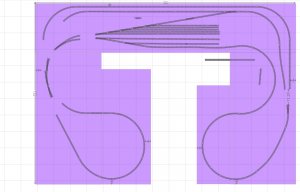
16 x 11 Basement layout planning 12pm 8-11-17.jpg

So this is what I have my layout looking like given my space constraints. I feel as though I have been making good use of the space, while creating opportunities for mainline runs and plenty of yard space. What I haven't done up to this point, is create the mainline sidings I want on the two end loops, and the industrial sidings for the layout.

One last cosmetic thing, I will be cutting the inside walkways larger and conforming to the radius of the inside curves to allow greater access for viewing and/or anything else. I won't be sticking to a rectangular or square edges
 
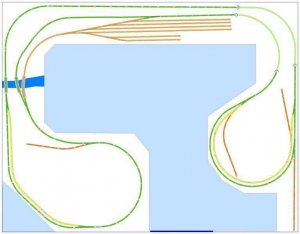
Below is the original layout design that I was basing this on, but I felt didn't give me enough options, especially for a mainline run.

IMG_8032.JPG
 
The plan you have there appears to indicate a doorway at the dark line. The position of the doorway in your room will determine where your "blobs" can be placed for access clearances. If it's possible to change an inward swinging door with a sliding door on the outside wall face, that can free up some space inside the room.
 
I've got a question about making curves with Peco 36" flex track (probably any other brands as well).

I'm trying to plot my layout using Anyrail program, and the smallest radius turn the program is allowing me to create is a 48" radius curve = a 96" circle which is far too big for my 16.5' x 11' space.

Scott
I have never utilized a software track design program, but a whole lot of folks on this forum seem to like this SCARM program.
http://www.modelrailroadforums.com/forum/showthread.php?20667-SCARM-Simple-Computer-Aided-Railway-Modeller


Your space sounds very similar to mine in outer dimensions, but I want to build a dbl-decker, around the wall, with a peninsula.
http://www.modelrailroadforums.com/forum/showthread.php?40307-Help-Please-design-a-dbl-deck-layout-in-its-own-Hand-House-shed


I just now am working on some cardboard mock-ups to figure out shelf and aisle sizes,...photos on my discussion.
 
Last edited by a moderator:


Affiliate Disclosure: We may receive a commision from some of the links and ads shown on this website (Learn More Here)

Back
Top