ModelRailroadForums.com is a free Model Railroad Discussion Forum and photo gallery. We cover all scales and sizes of model railroads. Online since 2002, it's one of the oldest and largest model railroad forums on the web. Whether you're a master model railroader or just getting started, you'll find something of interest here.
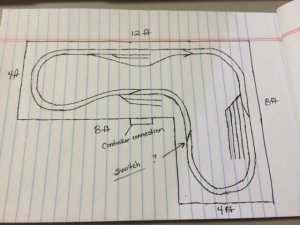
I've researched all weekend and narrowed it to NCE and Digitrax dcc systems. I've demoed the digitrax and my LHS on Friday. Wasn't crazy about the busy handheld display, but didn't seem too hard to understand. I did like the 2 throttle wheels on the handheld, but are they needed with a recall button on the NCE system? The videos I've watched on the Powercab makes it seem easy to set up and really like the plain english screen. Both seem to be very expandable. I'm leaning toward the Powercab to start with but have a few questions if NCE Powercabs supports the following:
1. Does the power cab have enough power to run 2-3 locos (1 w/sound) on my layout (photo attached).
2. I would like to have track sensors that change several track warning signals (from green to red) w/ loco detection and control crossing arms w/ lights w/ loco approaching.
3. On my size layout, how big is the need to have an move around handheld in the beginning?
4. What angle switches would you recommend for the switches between the tracks (inner and outer)
5. What switches for the small rail depots?
6. I would like the switches with through levers that lay down and rotate up and to the other side.
7. I will be using Flex track 100.
2. I would like to have track sensors that change several track warning signals (from green to red) w/ loco detection and control crossing arms w/ lights w/ loco approaching.
Well, just having lights for turnout direction and crossing lights/arms beside the track is fairly easy and can be done in many different ways. Pressure plates, reed switches, optical sensors, track current detection. On the other hand, true signaling where the signals are representing trains up ahead on the track (like Automatic Block Signaling ABS), is jumping off the deep end into very complicated stuff that is better left for its very own topic and thread (ask wombat457 about that one).
3. On my size layout, how big is the need to have an move around handheld in the beginning?
Not too much. One throttle on a 6' tether plugged into where your controller connection is indicated should be sufficient. The hard part about that will be operating the yard on the right side. I would highly recommend having a place to plug in a throttle over there right in front of the yard (right about where the "8 ft" is written).
4. What angle switches would you recommend for the switches between the tracks (inner and outer)
Since you are turning the track in 4' space that means your large radius is a maximum of 22". Any train that will go around 22" turn should have no problem with a #4.5 (Atlas Custom Line #4) or larger turnout. Considering this plan as drawn, I think #6s would fit for the crossovers and that one to the center tracks at the upper left. The yards and industries definitely smaller or they won't fit.
2. Well, just having lights for turnout direction and crossing lights/arms beside the track is fairly easy and can be done in many different ways. Pressure plates, reed switches, optical sensors, track current detection.
4. Since you are turning the track in 4' space that means your large radius is a maximum of 22". Any train that will go around 22" turn should have no problem with a #4.5 (Atlas Custom Line #4) or larger turnout. Considering this plan as drawn, I think #6s would fit for the crossovers and that one to the center tracks at the upper left. The yards and industries definitely smaller or they won't fit.
I'm assuming with my current drawing, my inner track would be 18" radius? I will be using flex track 100 and would like the 2 tracks close, but with plenty of clearance. So not too close. Hopefully to scale with real paired tracks. Would the #4.5 (Atlas Custom Line #4) work for that as well? For the yards and industry, I'd like them to be close together. What size would be needed? How does the sizing work, as in smaller number, smaller size or opposite?
5. You answered above.
I'm going with manual switches for the turnouts and crossovers. Do you recommend Atlas brand or another?
I'm assuming with my current drawing, my inner track would be 18" radius? I will be using flex track 100 and would like the 2 tracks close, but with plenty of clearance. So not too close.
Since you are using flex track you can make it anything you would like. No, I would think 18" radius would be too small. That would put the tracks on 4" centers. I would think 19.5" radius would work unless you are planning on trying to run really long equipment, then 19". I guess you could also go the other way and make the outside radius smaller (20.5")to fit better in the space, and leave the inside at 18, but usually the bigger the radius the better.
Hopefully to scale with real paired tracks. Would the #4.5 (Atlas Custom Line #4) work for that as well? For the yards and industry, I'd like them to be close together. What size would be needed? How does the sizing work, as in smaller number, smaller size or opposite?
The distance between parallel tracks when two turnouts are connected in crossover fashion is determine by the brand. I believe two Atlas #4s would put the tracks on 2" centers. But instead of changing turnouts one simply adds a straight section of track between them to get wider centers. I will check that tonight and post.
I'm going with manual switches for the turnouts and crossovers. Do you recommend Atlas brand or another?
You know, I always use the Atlas as a base-line because there is such a huge body of knowledge about their geometry and how they fit together. Also, I have used Atlas code 100 turnouts for over 4 decades with almost no problems. However; since the manufacturing changes in recent years I have seen many people talking about issues they are experiencing. I don't know if the issues are only with the code 83 or the entire line. I have zero experience with any of the newly manufactured turnouts so I am hesitant to "recommend" them ( I probably have a pile of 100 or so old ones sitting here to use). I should probably go out and buy a set or two of the new ones just so I can have first hand experience, to help people such as yourself.
Peco is a brand I can recommend. They are going to run about twice the price of the Atlas. They make a short, medium, and long turnout instead of using the normal North American frog numbers. That is probably because their code 100 turnouts are actually a European design, but I've yet met anyone who really notices the difference. If you go Peco make certain to get the "insulfrog" type, otherwise you will be getting into the need for gaping rails and extra wiring.
As promised here is some info about the Atlas #4 custom line turnouts.
For track separation of 2" the turnouts are placed directly together. To get 2 1/4" add a 1" straight between them. For 2 1/2" add a 2" straight. And for 3" add 4 1/4" straight.
The Peco Small Radius turnouts have a frog of 4.5 which is nearly identical to the Atlas #4. They have a departure angle of 12 degrees where the Atlas is 12.5 degrees. Once again nearly identical, so the same numbers above would be close enough to use for the Peco also.
I'm assuming the 2 turnouts are connected using the curved sections? As in on the main straight track, insert a right turnout an and connect a left turnout (connecting the 2 curved)?
If using 2 inches of foam board, do you recommend using cork rod bead as well?
Having a little trouble finding the atlas turnouts in stock. I'll keep searching the web for a store with good pricing.
I'm assuming the 2 turnouts are connected using the curved sections? As in on the main straight track, insert a right turnout an and connect a left turnout (connecting the 2 curved)?
Yes, that is the "normal" crossover configuration. Other things are possible to save space or reduce S-curves. I didn't see anything on your plan that would have needed such a different arrangement.
If using 2 inches of foam board, do you recommend using cork rod bead as well?
Is there something under the foam or is it the base? We have modular units that make up a portable layout. The foam is the table top so to speak. I put cork on mine and my friend didn't. We discovered that the track directly on the foam makes it act like a drum head. Very loud. We could tell the instant a train crossed from one of my modules onto his.
The cork also gives the track that raised prototypical look, but you could cut the roadbed into top of the foam.
Yes, that is the "normal" crossover configuration. Other things are possible to save space or reduce S-curves. I didn't see anything on your plan that would have needed such a different arrangement.
Is there something under the foam or is it the base? We have modular units that make up a portable layout. The foam is the table top so to speak. I put cork on mine and my friend didn't. We discovered that the track directly on the foam makes it act like a drum head. Very loud. We could tell the instant a train crossed from one of my modules onto his.
The cork also gives the track that raised prototypical look, but you could cut the roadbed into top of the foam.
I built 2 8x4 1/2 plywood tables using 2x4s as framing. A friend is giving me the foam board this weekend. The tables will have 2 inches of foam board unless you recommend different. I like the raised look of the cork bed. Going to place an order tomorrow for track and other supplies. I used a lot of online stores in my RC racing. Any stores you guys recommend? I support my local hobby store (1 hr away) but looking for a few online stores as well.
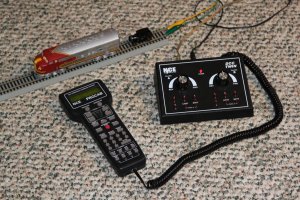
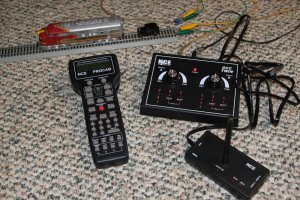
Generally the systems have memory. You can unplug from one location and the loco will continue as if nothing has happened until you plug in again. However using the NCE-PRO throttle off the Twin might not work in this manner, because the memory might be in the throttle. When I get home next week I can try that out and let you know.
OK, As promised I tried this. The result is as expected. One can unplug the ProCab throttle from the Twin and the locomotive continues going. Plug the throttle back in and it remembers the channel it was on and immediately picks up control of the loco. This is while the Twin continues to control its loco. The F7 was on the ProCab throttle and the track inspection car was on the A throttle of the Twin. In this exact configuration, the only limitations of this system are the 3 Amps of the Twin and there is no separate output for a programming track. In a similar fashion I connected the wireless transceiver and used the PROCAB wireless. The results were the same.
WIRED--------------------------------------------------------------------WIRELESS
Question on installing a automated RR crossing station. My son loves RR crossing stations. We currently use the the Bachmann EZ track crossing where the arms drop when the train moves over the pressure plate. Since I'm moving to dcc and Flex track 100, with the new layout, what's the best way to do a crossing like this? I see that I can buy lighted signals. Are moving arms an option or just the lighted signals? I can see if the signals have flashing lights and a bell that I might can get away from moving arms. Having a RR crossing is a must for him, so any recommendations is appreciated.
Also, what are your thoughts on removing the side rails on the lower middle and placing the crossing there?
Operating crossing gates exist (see the Walthers catalog for possibilities). Most of these can be actuated by using a Tortise or similar slow-motion switch machine...IF the area under the top of the table is clear of the layout structure. I have five grade crossings on my layout. One is free of underlying structure, and I have crossing gates with the Tortise machines controlling the gates. The other four crossings, unfortunately, are located smack dab over the 2x4 framing (one actually is right over my control panel). Poor planning on my part I guess. These crossings are "protected" only by flashing crossbucks, with infrared sensors actuating them.
Question on installing a automated RR crossing station. My son loves RR crossing stations. We currently use the the Bachmann EZ track crossing where the arms drop when the train moves over the pressure plate. Since I'm moving to dcc and Flex track 100, with the new layout, what's the best way to do a crossing like this?
Pressure plates are unreliable at best, reed switches require the addition of magnets to the locos to activate them. Most crossing gates that I've seen implemented on layouts utilize the infrared sensors for them. That method keeps the crossing gates circuitry totally separate from the train power.
I see that I can buy lighted signals. Are moving arms an option or just the lighted signals?
There are very few side tracks on the layout to begin with. I would think a crossing could be put almost anywhere along the sections of track where there is nothing else. The "loop" on the lower left (a bit to the left and above the 8 ft label) seems to be wide open, as is the curve in the lower left of the short "L" leg.
Iron horse, Thanks for the info and link to the crossing info.
There are very few side tracks on the layout to begin with. I would think a crossing could be put almost anywhere along the sections of track where there is nothing else. The "loop" on the lower left (a bit to the left and above the 8 ft label) seems to be wide open, as is the curve in the lower left of the short "L" leg.
I agree, don't really want to loose the few side tracks I have. The 2 locations you pointed out will work fine. I'm currently trying my hand at Railmodeler software designing my current layout. With the current layout, the industrial yard (on the right), the longest leg of the side tracks is 28" and the rest get shortened quickly. Would I be better off moving the industrial yard to the longest section (top sections) and moving the small top side tracks to the right side? It would give me longer side tracks to store idle trains.
I really need some advice on this as I'm beating myself up. Should I design the layout completely, then buy the tracks or should I go ahead and purchase the tracks to start laying out and adjust as needed? I prefer the last method, as it seems more fun and is hands on then the software way. I know I will probably change the layout as I go anyway to suit needs/wants.
I'm open on any suggestions for changing the layout to make it flow better and seem more realistic. I'm just ready to get my hands dirty and start laying the track.



 Poor planning on my part I guess. These crossings are "protected" only by flashing crossbucks, with infrared sensors actuating them.