Any Rail 5

ModelRailroadForums.com is a free Model Railroad Discussion Forum and photo gallery. We cover all scales and sizes of model railroads. Online since 2002, it's one of the oldest and largest model railroad forums on the web. Whether you're a master model railroader or just getting started, you'll find something of interest here.


First, I will admit that I am a little slow at some things.

I downloaded AnyRail 5 and can't get to first base.

Where do you start?

What is the objective?

Any tips?

I want to make a dogbone layout.

Bill
 
Hey Mister Bill,

Don't feel bad, it is very easy to use, but like lots of different software the hardest part is getting started.

You start by opening the program click on "track libraries" you will see they are organized by scale, then broke down by individual manufacture. Select the track you are using and on the left hand side it will bring up the pieces of track that are available from that manufacturer.

Just click on the piece you want and it will appear in your works space. Add as many as you want and drag them end to end to connect them.

Now you have begun! Still lots to learn and do but don't be shy click on stuff and if you make a mess close it and open a new one.

As for the objective, well its to make a track plan basically, but the rest is up to you.

I am out of time but I will try to come back later and see if I can be of any further help.

I wish you well.


Well done!

Its a great program and I have only scratched the surface of it. I feel it was well worth buying. I have had a lot of fun just playing around with it.

Only negative part is that it has caused me to change my layout several times, but that is my own fault.
 
Hey Kevin,

No, I have only used AnyRail I don't know anything about any other software, sorry.

You can download a free trail of AnyRail with no strings attached, no spam or spy ware to worry about, at least not when I first tried it 7 or 8 months ago.
 
AnyRail is simple, but to get the most out of it (like more than 50 pieces of track) you need to buy the whole thing.

SCARM is good because it doesn't have the limitations like the free AnyRail, but it is more advanced and, IMO, requires a more computer literate user. I like the options and variability of SCARM much more than AnyRail.

When I started making my layout plan, I was using AnyRail. When I was introduced to SCARM, I gave it a shot and haven't used AnyRail since.
 
I started out using SCRAM and I liked it.
Fairly easy to use and it had good documentation.
I tried Anyrail and it was about the same.
Several of the main reasons I stayed with Anyrail is that SCRAM did not have Fast Tracks in the library and I like how Anyrail handled flex track better for me.

Both are very good programs.
I have tried Xtrxcad.
For me it is very confusing, but it does a good job.
Xtrxcad appears to me to be more for the person that wants hand lay track.
Xtrxcad does have libraries for manufactured track as I remember.
 
A lot of it probably depends on what you're used to. I see some of the programs that are presented in some form of 3D and they just confuse me. Not that AnyRail doesn't work in three dimensions because it does allow you to adjust track elevation and smooth slopes between any two points. Tell you the percent of grade too. I tried pretty much every trial and/or free program that was out there and just settled on AnyRail as the best for my eyes and what I was used to. The very best feature for me, however, on a layout that's essentially a huge square, is the I could print out the track plan (all 250+ pages) with an alignment grid included on those prints, and actually glue it straight down to my layout. Every single bit of track I lay is ultra-precise and no having to essentially re-draw or re-measure the layout once it's been finished on the computer.

I think any program is going to take some figuring out, and AnyRail wasn't any exception. I spent a lot of hours just playing and trying and figuring out what would work, both in the program and the real world. I had a small "test" layout that I designed and built before tackling this monster.

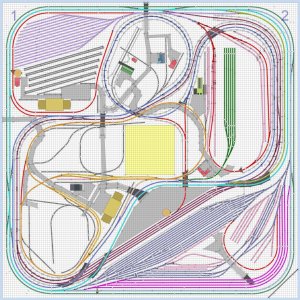
My layout, for what it's worth. Trackwork is about 20% complete at this point.

 

Attachments

  • track.JPG
    track.JPG
    268.1 KB · Views: 469
Last edited by a moderator:


Xtrxcad appears to me to be more for the person that wants hand lay track.
Xtrxcad does have libraries for manufactured track as I remember.
I'm unclear as to which features of XTrackCAD (that's its correct name) make it intended for those who hand lay their track. I use XTrackCAD exclusively and have never hand laid an inch of track!

XTrackCAD includes parameter files for many brands of track in many scales. XTrackCAD parameter files are available for N-scale Fast Tracks turnouts and for many brands of structures as well.

The initial learning curve is steep, but that's true for other track planning software, too. The tutorials on the XTrackCAD web site were enough to get me started. Besides, it's FREE!

- Jeff
 
Hi Dale -

I apologize if I sounded upset. I am not -- not in the least. But I am really curious as to what makes a track planning program particularly suited to those who hand lay their track. Never having hand laid any track (though I might one day), I am completely ignorant about how one track planning program would be better than another for those who hand lay.

I built my layout with Atlas code 55 flex and turnouts (in the Good Old Days when they were readily available), so hand laying was not on my radar when choosing software.

- Jeff
 
A lot of it probably depends on what you're used to. I see some of the programs that are presented in some form of 3D and they just confuse me. Not that AnyRail doesn't work in three dimensions because it does allow you to adjust track elevation and smooth slopes between any two points. Tell you the percent of grade too. I tried pretty much every trial and/or free program that was out there and just settled on AnyRail as the best for my eyes and what I was used to. The very best feature for me, however, on a layout that's essentially a huge square, is the I could print out the track plan (all 250+ pages) with an alignment grid included on those prints, and actually glue it straight down to my layout. Every single bit of track I lay is ultra-precise and no having to essentially re-draw or re-measure the layout once it's been finished on the computer.

I think any program is going to take some figuring out, and AnyRail wasn't any exception. I spent a lot of hours just playing and trying and figuring out what would work, both in the program and the real world. I had a small "test" layout that I designed and built before tackling this monster.

My layout, for what it's worth. Trackwork is about 20% complete at this point.

My My that certainly is impressive, I hope you are not going to run it by yourself:rolleyes::D
Some of your staging yards are bigger than my layout;)

Looks great
Gary
 
I have found that if you export your Anyrail design that it can be imported into Sketchup to view in 3D.
I found that this helps greatly with the design of bench work.
 
Last edited by a moderator:
I tried to download SCARM yesterday, and my Avast blocked it, claiming a virus. I am not taking any chances, but I can't get there from here.

Bill
 
Ahh, the wonderful false blockings of Avast. I used to run that software. Send me the link where you are downloading from and I will see what I get.

My advice - download Microsoft Security Essentials. It's completely free, and in my completely geeky opinion is the absolute best virus software out there for the home user. I have been using PC's since the 80's. I have used MSE for a few years and it has been phenominal. Who better to know how to protect Windows than Microsoft?


Affiliate Disclosure: We may receive a commision from some of the links and ads shown on this website (Learn More Here)

Back
Top